Dynamic Ticket Pricing
Stop leaving money on the table. Cohost automatically adjusts ticket prices based on real-time demand, time-to-event, and remaining inventory so you capture the true value of every seat.
Static prices force you to guess what buyers will pay weeks before your event. Guess too high and seats go empty. Guess too low and you lose revenue. Dynamic pricing removes the guesswork by responding to real market signals as they happen.
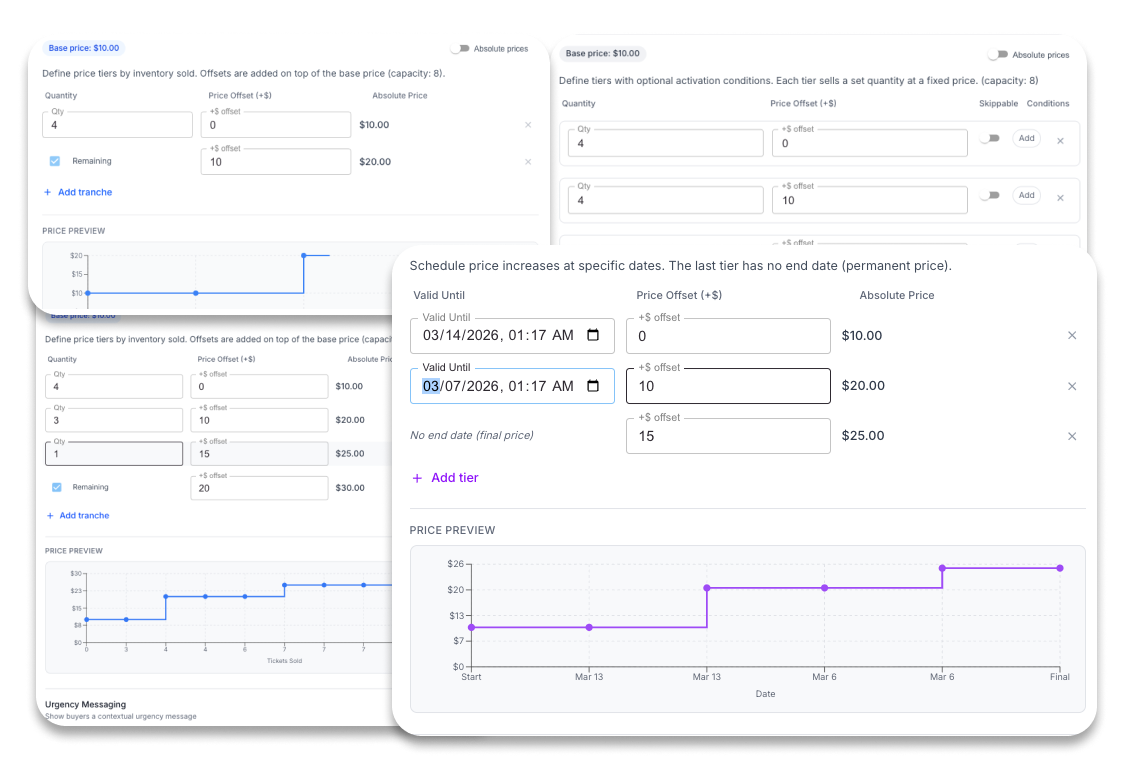
Four pricing models, one goal
Choose the model that fits how your audience buys — or combine them. Inventory ladder steps the price up as tickets sell. Time-based tiers activate on dates you set. Velocity surge bumps the price when sales spike. Tiered plans mix all three conditions so whichever triggers first advances the price. Every model enforces a floor price, so tickets only go up.
Works across every channel you sell on
Dynamic pricing is built into Cohost's integrations. When a rule adjusts a price, the change syncs to every connected platform — your box office, your website widget, and third-party ticketing channels. Sales from external platforms feed back into the same demand signals, so the pricing engine always sees the full picture regardless of where the ticket was sold.
Set it up in a single click
Start from a pricing template — early-bird ladder, last-minute surge, or balanced tiered — and assign it to any ticket type with one click. Templates come pre-configured with sensible floors, ceilings, and trigger thresholds so you can launch dynamic pricing in seconds and fine-tune later.
Every price change, logged and visible
Every automatic adjustment and manual bump is recorded in a full audit trail — the trigger type, previous price, new price, and timestamp. Over time you build a picture of exactly how price-sensitive your audience is and which price points convert best, making every future event more profitable.
Built for serious organizers
Real-time updates
Price changes take effect immediately across all sales channels.
Checkout price lock
Once a buyer starts checkout the price is locked. No surprises.
Granular controls
Set rules per ticket type, date range, or inventory threshold.
Full audit trail
Every price change is logged with the rule that triggered it.
Common questions
How do I choose between the four pricing models?
The right model depends on what drives demand at your events. If demand is inventory-driven (sell-outs are common), start with the Inventory Ladder. If your audience responds to deadlines, use Time-Based. If you run events that can go viral overnight, add Velocity Surge. If you need multiple conditions to interact — sell 200 tickets or hit a date, whichever comes first — use the Combined Tiered model. You can run different models on different ticket types within the same event.
Can I use dynamic pricing on some ticket types but not others?
Yes. Pricing rules are assigned per ticket type. You can put an Inventory Ladder on your General Admission tickets while keeping VIP at a fixed price, or run a Time-Based schedule on one ticket type and Velocity Surge on another — all for the same event.
What is the baseline price and how does it work?
The baseline price is your ticket's starting price — the floor below which dynamic adjustments will not go. All pricing rule offsets are calculated above the baseline. By default, prices only increase from the baseline (rollback protection is on). This means a refund or a slow period does not cause the price to drop back down.
Can tickets have a maximum price cap?
Each pricing model has its own ceiling mechanism. For Inventory Ladder and Time-Based, your defined tranches and tiers set the upper bound — the price cannot exceed the highest tier you configured. For Velocity Surge, you set an explicit maximum offset above baseline. When that ceiling is reached, no further automatic bumps occur. For the Combined Tiered model, the highest tier you define is the maximum the plan can reach.
Does a refund return tickets to an earlier price tranche?
No. Refunds do not reactivate sold tranches or return inventory to the Inventory Ladder. Once a tranche is exhausted and the price has advanced, the refunded quantity does not pull the price back. This is by design — it prevents buyers from manipulating the pricing by returning tickets to reset an inventory tier.
Will buyers see price changes mid-checkout?
No. The price is locked the moment a buyer adds tickets to their cart and begins checkout.
Can I manually override the price at any time?
Yes. The manual bump modal lets you increase a ticket's price on demand — enter the bump amount, add an optional note, and confirm. The change takes effect immediately and appears in the audit trail alongside all automatic adjustments. The manual bump does not disable the active pricing rule; automatic evaluations continue from the new price level.
What does the audit trail record?
Every price change — automatic or manual — is recorded with the trigger type (inventory ladder, time transition, velocity surge, tiered advance, or manual), the previous price, the new price, and the timestamp. Manual bumps also include an optional note field where you can record your reason. The audit log is paginated and persisted, so you can review your full pricing history for any event after it concludes.
Does dynamic pricing work with coupons?
Yes. Coupons apply on top of the dynamically adjusted price, and you can configure whether coupons should respect the price floor.
Does Cohost's dynamic pricing use AI or machine learning?
Yes. Cohost learns from your pricing history and event outcomes to make better recommendations over time. The system takes note of which strategies drove the most conversions, which price points performed best, and how your audience responded to different triggers — then uses those patterns to suggest smarter rule configurations for future events.
How is dynamic pricing different from what most ticketing platforms offer?
Most ticketing platforms offer fixed price fields and leave price changes to you. Cohost includes an automated rules engine — four distinct pricing models that evaluate on sales events and a scheduled clock — built into the platform. No third-party pricing tools, no API integrations, no manual monitoring required during your on-sale period.